
Advanced Traffic Management Guide K/KA/KB.15.15





• Meshing is not supported on ports configured with 802.1X access control.
• On a port configured for meshing, if you subsequently remove meshing from the port's
configuration and reboot the switch, the port returns to its default configuration. (It does not
revert to any non-default configuration it had before being configured for meshing).
• In a given mesh domain, switches in the same product family must run the same switch software
version. For example, if you update the software version on one 8212zl switch, then you must
update the software version on any other 8212zl switch in the mesh. HP recommends that
you always use the most recent software version available for the switches in your network.
• The spanningtree configuration must be the same for all switches in the mesh (enabled or
disabled). If spanning tree is enabled in the mesh, it must be the same version on all switches
in the mesh: 802.1D, 802.1w, or 802.1s.
• If a switch in the mesh has GVRP enabled, then all switches in the mesh must have GVRP
enabled. Otherwise, traffic on a dynamic VLAN may not pass through the mesh.
If a switch in the mesh has a particular static VLAN configured, then all switches in the mesh
must have that static VLAN configured.
• If a switch in the mesh has IGMP enabled, then all switches in the mesh must have IGMP
enabled.
• If a switch in the mesh has LLDP enabled, then all switches in the mesh must have LLDP enabled.
• After adding or removing a port from the mesh, you must save the current configuration and
reboot the switch in order for the change to take effect.
• Dynamic IP Lockdown and Virus Throttling should not be activated on mesh ports. These are
security features for edge ports and mesh ports are not edge ports.
• DHCP Snooping and ARP protection are enabled through VLANs. Mesh ports belong to all
VLANs, so if these security features are enabled on a switch that has mesh ports, the mesh
ports must be configured as “trusted” ports because meshing may move the port of a MAC
address in the mesh based on the least cost path.
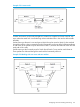
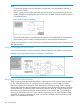
• Multiple meshed domains require separation by either a non-meshed switch or a non-meshed
link. For example:
Figure 27 Multiple meshed domains separated by a non-mesh switch or a non-mesh link
• If GVRP is enabled, meshed ports in a switch become members of any dynamic VLANs created
in the switch in the same way that they would if meshing was not configured in the switch.
About switch meshing 179