
Advanced Traffic Management Guide K/KA/KB.15.15

x.15.09 and later allow a VRRP virtual router MAC address to move from the master to the
backup without being blocked by meshing on connected switches in the mesh.
• Using 5300 series switches in the same mesh domain that implements VRRP with concurrent
meshing and routing is not recommended.
Other requirements and restrictions
Mesh support within the domain All switches in the mesh domain, including edge switches,
must support the HP witch meshing protocol.
Switch hop count in the mesh domain A maximum of five (meshed) switch hops is allowed in the
path connecting two nodes in a switch mesh domain. A
path of six meshed hops is unusable. However, this does
not interfere with other, shorter paths in the same domain.
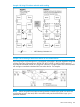
Connecting mesh domains To connect two separate switch meshing domains, you must
use non-meshed ports. (The non-meshed link can be a port
trunk or a single link.) See Figure 27 (page 179).
Multiple links between meshed
switches
Multiple mesh ports can be connected between the same
two switches, to provide higher bandwidth. Each port that
you want in the mesh domain should be configured as Mesh
(and not as a trunk—Trk). If you configure a port as Mesh,
there is no Type selection for that port.
Network monitor port If a network monitor port is configured, broadcast packets may
be duplicated on that port if more than one port is being monitored
and switch meshing is enabled.
Compatibility with other switches The switches covered in this guide operate with the Series
5300xl switches in normal mode.
Rate limiting not recommended on
meshed ports
Rate limiting can reduce the efficiency of paths through a
mesh domain.
For additional information on troubleshooting meshing problems, see the Basic Operations Guide
for your switch.
About switch meshing 187