
Advanced Traffic Management Guide K/KA/KB.15.15
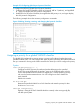
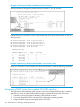
3. Assign the DSCP policies to the specified IP-device addresses and display the result.
HP Switch(config)#: qos device-priority 10.28.31.1 dscp 000111
HP Switch(config)#: qos device-priority 10.28.31.130 dscp 000101
HP Switch(config)#: qos device-priority ipv4 10.28.32.100/24 dscp 000010
HP Switch(config)#: qos device-priority 2001:db8:2:1:212:79ff:fe88:a100 dscp 000
HP Switch(config)#: qos device-priority ipv6 2001:db8:3:3/64 dscp 000010
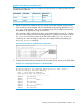
HP Switch(config)#: show qos device-priority
Device priorities
Device Address Apply rule | DSCP Priority
-------------------------------------------- ---------- + ------ -----------
10.28.31.1 Priority | 000111 7
10.28.31.130 Priority | 000101 5
10.28.32.100/24 Priority | 000010 1
2001:db8:2:1:212:79ff:fe88:a100 Priority | 000101 3
2001:db8:3:3/64 Priority | 000010 1
The switch applies the DSCP policies in Figure 35 (page 202) to IP packets with the specified IP
addresses and subnet masks (source or destination) received in the switch. The switch manages
the packets as follows:
• Overwrites the original DSCPs in the selected packets with the new DSCPs specified in the
above policies.
• Assigns the 802.1p priorities in the above policies to the appropriate packets.
Assigning an 802.1p priority for a global IP-precedence classifier
If a device or application upstream of the switch sets the precedence bits in the ToS/Traffic Class
byte of IPv4/IPv6 packets, you can use this global packet-marking option to prioritize packets for
outbound port queues. If the outbound packets are in a tagged VLAN, this priority is carried as
an 802.1p value to the adjacent downstream devices.
Syntax:
qos type-of-service ip-precedence
Causes the switch to automatically assign an 802.1p priority to all IP packets (IPv4
and IPv6) by computing a packet's 802.1p priority from the precedence bits the
packet carries. This priority determines the packet's queue in the outbound port to
which it is sent. If the packet leaves the switch on a tagged port, it carries the
802.1p priority with it to the next downstream device.
ToS IP Precedence Default: Disabled
no qos type-of-service
Disables all ToS classifier operation, including prioritization using the precedence
bits.
show qos type-of-service
When the IP-precedence mode is enabled (or if neither Type-of-Service option is
configured), this command displays the ToS configuration status. If the Diff-serv
mode is enabled, codepoint data is displayed.
Using the IP-precedence classifier, prioritization of outbound packets relies on the IP-Precedence
bit setting that IP packets carry with them from upstream devices and applications. To configure
and verify this option:
Assigning an 802.1p priority for a global IP-precedence classifier 203