
Advanced Traffic Management Guide K/KA/KB.15.15
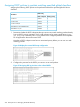
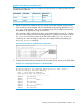
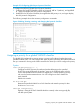

Example 153 Viewing the VLANs available for QoS prioritization
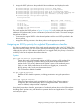
802.1p priorities are assigned to packets received in VLANs 1, 20, 30, and 40:
Enter the following commands to mark VLAN packets that match the specified VLAN IDs with an
802.1p priority:
HP Switch(config)#: vlan 1 qos priority 2
HP Switch(config)#: vlan 20 qos priority 5
HP Switch(config)#: vlan 30 qos priority 5
HP Switch(config)#: vlan 40 qos priority 7
HP Switch(config)#: show qos vlan
VLAN priorities
VLAN ID Apply rule | DSCP Priority
------- ------------+ ------ -------------
1 Priority | 2
20 Priority | 5
30 Priority | 5
40 Priority | 7
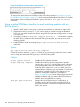
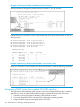
Example 154 Returning a QoS-prioritized VLAN to "No-override" status
If later it is necessary to remove VLAN 20 from QoS prioritization, enter the following command:
Assigning a DSCP policy for a global VLAN-ID classifier
This global QoS packet-marking option assigns a previously configured DSCP policy (codepoint
and 802.1p priority) to outbound IP packets having the specified VLAN-ID (VID). The switch:
1. Selects an incoming IP packet on the basis of the VLAN-ID it carries.
2. Overwrites the packet's DSCP with the DSCP configured for matching packets.
3. Assigns the 802.1p priority associated with the new DSCP.
210 Quality of Service: Managing bandwidth effectively