
Advanced Traffic Management Guide K/KA/KB.15.15


Changing VLAN support settings (Menu)
The following procedure provides instructions for changing the maximum number of VLANs to
support, changing the primary VLAN selection, and enabling or disabling dynamic VLANs.
1. From the Main Menu select: 2. Switch Configuration —> 8. VLAN Menu … —> 1. VLAN
Support
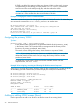
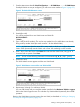
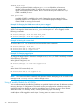
You see the following screen:
Figure 4 The default VLAN Support screen
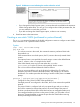
2. Press E (for Edit), and then do one or more of the following:
• To change the maximum number of VLANs, enter the new number (1 - 2048 allowed;
default 256).
• To designate a different VLAN as the Primary VLAN, select the Primary VLAN field and
use the space bar to select from the existing options. The Primary VLAN must be a static,
port-based VLAN.
• To enable or disable dynamic VLANs, select the GVRP Enabled field and use the Space
bar to toggle between options.
NOTE: For optimal switch memory utilization, set the number of VLANs at the number you
will likely be using or a few more. If you need more VLANs later, you can increase this number,
but a switch reboot will be required at that time.
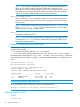
3. Press Enter and then S to save the VLAN support configuration and return to the VLAN Menu
screen.
If you changed the value for Maximum VLANs to support, an asterisk appears next to the
VLAN Support option.
26 Static Virtual LANs