
Advanced Traffic Management Guide K/KA/KB.15.15



Impact of QoS queue configuration on guaranteed minimum bandwidth
(GMB)
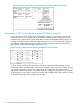
Changing the number of queues removes any bandwidth-min output settings in the startup
configuration, and automatically re-allocates the GMB per queue as shown in the following table.
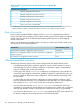
Table 26 Default GMB percentage allocations per QoS queue configuration
2 Queues4 Queues8 Queues
(default)
802.1p
priority
GMBQueueGMBQueueGMBQueue
20%18%12%11 (lowest)
3%22
17%230%30 (normal)
10%43
80%230%310%54
10%65
45%415%76
20%87 (highest)
NOTE: See the Management and Configuration Guide. for your switch.
Setting minimum guaranteed bandwidth with 8 queues
When 10 Mbps ports on an 8200zl or 5400zl switch are configured in QoS for eight outbound
queues (the default), and the guaranteed minimum bandwidth is set for 5 Mbps or less for a given
queue, then packets in the lower-priority queues may be discarded on ports that are oversubscribed
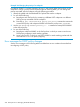
for extended periods of time. If the oversubscription cannot be corrected, HP recommends
reconfiguring the switch to operate with four outbound queues. The command to do this is:
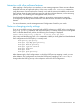
HP Switch(config)#: qos queue-config 4-queues
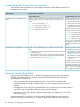
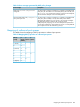
This issue applies to 8200zl and 5400zl switches operating with any of the following modules
installed.
Minimum
supported
software version
Product
number
HP device
K.15.02.0004J9534AHP Switch 24-port 10/100/1000 PoE+v2 zl Module
K.15.02.0004J9535AHP Switch 20-port 10/100/1000 PoE+ / 4-port SFP v2 zl Module
K.15.02.0004J9536AHP Switch 20-port 10/100/1000 PoE+ / 2-port 10-GbE SFP+ v2 zl Module
K.15.02.0004J9537AHP Switch 24-port SFP v2 zl Module
K.15.02.0004J9538AHP Switch 8-port 10-GbE SFP+ v2 zl Module
K.15.02.0004J9547AHP 24-port 10/100 PoE+ v2 zl Module
K.15.02.0004J9548AHP 20-port Gig-T / 2-port 10-GbE SFP+ v2 zl Module
K.15.02.0004J9549AHP 20-port Gig-T / 4-port SFP v2 zl Module
K.15.02.0004J9550AHP 24-port Gig-T v2 zl Module
K.15.02.0004J9637AHP 12-port Gig-T / 12-port SFP v2 zl Module
260 Quality of Service: Managing bandwidth effectively