
Advanced Traffic Management Guide K/KA/KB.15.15
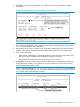
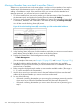
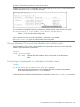
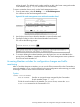

Example 181 A commander and three switches in a stack
Suppose you want to use the Commander to remove the North Sea member from the following
stack:
Execute this command to remove the North Sea switch from the stack:
HP Switch(config)#: no stack member 3 mac-address 0030c1-7fc700
where:
• 3 is the North Sea member's switch number (SN)
• 0030c1-7fc700 is the North Sea member's MAC address
Removing a stack Member using the Member’s CLI
Syntax:
no stack join mac-addr
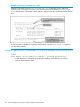
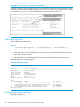
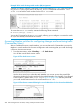
To use this method you need the Commander's MAC address, which is available
using the show stack command in the Member's CLI.
Example 182 Identifying the commander's MAC address from a member switch
Execute the following command in the North Sea switch's CLI to remove the switch from the
stack:
North Sea(config)#: no stack join 0030c1-7fec40
Removing a stack Member (Menu)
These rules affect removals from a stack:
• When a Candidate becomes a Member, its Auto Join parameter is automatically set to
No. This prevents the switch from automatically rejoining a stack as soon as you remove it
from the stack.
• When you use the Commander to remove a switch from a stack, the switch rejoins the
Candidate pool for your IP subnet (broadcast domain), with Auto Join set to No.
• When you remove a Member from a stack, it frees the previously assigned switch number
(SN), which then becomes available for assignment to another switch that you may subsequently
278 Stack management for the 3500, 3500yl, 6200yl and 6600 switches