
Advanced Traffic Management Guide K/KA/KB.15.15
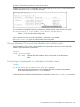

add to the stack. The default switch number used for an add is the lowest unassigned number
in the Member range (1 - 15; 0 is reserved for the Commander).
To remove a Member from a stack, use the Stack Management screen.
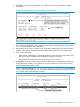
1. From the Main Menu, select 9. Stacking... —> 4. Stack Management
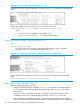
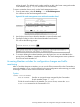
You will then see the Stack Management screen.
Figure 62 The stack management screen with stack members listed
2. Use the down arrow key to select the Member to remove from the stack.
3. Type D (for Delete) to remove the selected Member from the stack.
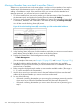
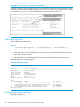
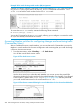
You will see the following prompt:
4. To continue deleting the selected Member, press the Space bar once to select Yes for the
prompt, then press Enter to complete the deletion. The Stack Management screen updates to
show the new stack Member list.
Accessing Member switches for configuration changes and traffic
monitoring
After a Candidate becomes a Member, you can use the Telnet command from the Commander to
access the Member's CLI or console interface for the same configuration and monitoring you would
do through a Telnet or direct-connect access from a terminal.
Syntax:
telnet switch-number
switch-number Specifies an unsigned integer assigned by the Commander
to each member (range: 1 - 15).
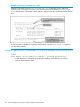
To find the switch number for the Member you want to access, execute the show
stack view command in the Commander's CLI.
Accessing Member switches for configuration changes and traffic monitoring 279