
Advanced Traffic Management Guide K/KA/KB.15.15
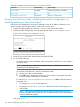
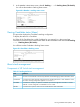
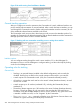
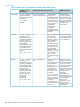
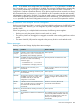
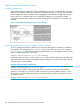

Table 28 Candidate configuration options in the menu interface
Other settingsDefault settingParameter
Commander, Member, or DisabledCandidateStack State
NoYesAuto Join
Range: 1 to 300 seconds60 SecondsTransmission Interval
Pushing a switch into a stack, modifying the switch’s configuration, or
disabling stacking on the switch (Menu)
Use Telnet or the WebAgent to access the Candidate if it has an IP address. Otherwise, use a
direct connection from a terminal device to the switch's console port.
1. Display the Stacking Menu by selecting Stacking in the console Main Menu.
2. Display the Stack Configuration menu by pressing 3 to select Stack Configuration.
Figure 65 The default stack configuration screen
3. Move the cursor to the Stack State field by pressing E (for Edit).
4. Do one of the following:
• To disable stacking on the Candidate, use the Space bar to select the Disabled option,
then go to step 5.
NOTE: Using the menu interface to disable stacking on a Candidate removes the
Candidate from all stacking menus.
• To insert the Candidate into a specific Commander's stack:
Use the space bar to select Member.a.
b. Press Tab once to display the Commander MAC Address parameter, then enter
the MAC address of the desired Commander.
• To change Auto Join or Transmission Interval, use Tab to select the desired
parameter, and:
• To change Auto Join, use the Space bar.
• To change Transmission Interval, enter the new value in the range of 1 to
300 seconds.
NOTE: All switches in the stack must be set to the same transmission interval to
help ensure proper stacking operation. HP recommends that you leave this parameter
set to the default 60 seconds.
Then go to Step 5.
282 Stack management for the 3500, 3500yl, 6200yl and 6600 switches