
Advanced Traffic Management Guide K/KA/KB.15.15
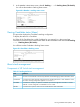
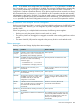

3. In the Member's Main Menu screen, select 9. Stacking ... —> 1. Stacking Status (This Switch).
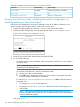
You will see the Member's Stacking Status screen:
Figure 68 A Member's stacking status screen
Viewing Candidate status (Menu)
This procedure displays the Candidate's stacking configuration.
To display the status for a Candidate:
Use Telnet (if the Candidate has a valid IP address for your network) or a direct serial port
connection to access the menu interface Main Menu for the Candidate switch and select 9. Stacking
... —> 1. Stacking Status (This Switch).
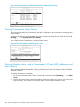
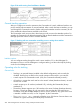
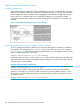
You will then see the Candidate's Stacking Status screen:
Figure 69 A Candidate's Stacking screen
About stack management
Components of HP Switch stack management
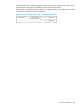
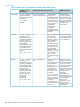
Table 30 Stacking definitions
DefinitionTerm
Consists of a Commander switch and any Member switches belonging to that Commander's stack.Stack
A switch that has been manually configured as the controlling device for a stack. When this occurs,
the switch's stacking configuration appears as Commander.
Commander
A switch that is ready to join (become a Member of) a stack through either automatic or manual
methods. A switch configured as a Candidate is not in a stack.
Candidate
A switch that has joined a stack and is accessible from the stack Commander.Member
Viewing Candidate status (Menu) 285