
Advanced Traffic Management Guide K/KA/KB.15.15
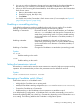
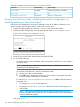
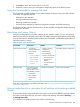
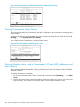
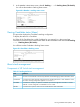
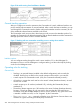
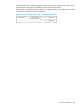
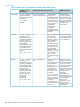
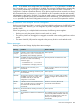
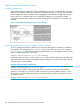

Figure 70 A switch moving from Candidate to Member
General stacking operation
After you configure one switch to operate as the Commander of a stack, additional switches can
join the stack by either automatic or manual methods. After a switch becomes a Member, you can
work through the Commander switch to further configure the Member switch as necessary for all
of the additional software features available in the switch.
The Commander switch serves as the in-band entry point for access to the Member switches. For
example, the Commander's IP address becomes the path to all stack Members and the Commander's
Manager password controls access to all stack Members.
Figure 71 Stacking with one commander controlling access to wiring closet switches
Interface options
You can configure stacking through the switch's menu interface, CLI, or the WebAgent For
information on how to use the WebAgent to configure stacking, see the online Help by clicking
on the ? in the WebAgent screen.
Operating rules for stacking
General rules
• Stacking is an optional feature (enabled in the default configuration) and can easily be
disabled. Stacking has no effect on the normal operation of the switch in your network.
• A stack requires one Commander switch. (Only one Commander allowed per stack.)
• All switches in a particular stack must be in the same IP subnet (broadcast domain). A stack
cannot cross a router.
• A stack accepts up to 16 switches (numbered 0-15), including the Commander (always
numbered 0).
• The stacking feature supports up to 100 switches in the same IP subnet (broadcast domain),
however, a switch can belong to only one stack. In the event that the 100 switch limit is
exceeded, it may take multiple attempts to add or move a member to any given stack. Once
a member is added to a stack, it is not "forgotten" by the Commander.
• The stack status (all) command will display up to 100 devices. Devices that are not
members of a given stack may periodically drop out of the list.
286 Stack management for the 3500, 3500yl, 6200yl and 6600 switches