
Advanced Traffic Management Guide K/KA/KB.15.15
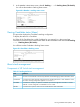

NOTE: In the default stack configuration, the Candidate Auto Join parameter is enabled, but
the Commander Auto Grab parameter is disabled. This prevents Candidates from automatically
joining a stack prematurely or joining the wrong stack (if more than one stack Commander is
configured in a subnet or broadcast domain). If you plan to install more than one stack in a subnet,
HP recommends that you leave Auto Grab disabled on all Commander switches and manually
add Members to their stacks. Similarly, if you plan to install a stack in a subnet (broadcast domain)
where stacking-capable switches are not intended for stack membership, you should set the Stack
State parameter (in the Stack Configuration screen) to Disabled on those particular switches.
Stacking operation with multiple VLANs configured
Stacking uses the primary VLAN in a switch. In the factory-default configuration, the DEFAULT_VLAN
is the primary VLAN. However, you can designate any VLAN configured in the switch as the
primary VLAN.
When using stacking in a multiple-VLAN environment, the following criteria applies:
• Stacking uses only the primary VLAN on each switch in a stack.
• The primary VLAN can be tagged or untagged as needed in the stacking path from switch to
switch.
• The same VLAN ID (VID) must be assigned to the primary VLAN in each stacked switch.
Status messages
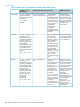
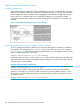
Stacking screens and listings display these status messages:
Action or RemedyConditionMessage
None requiredIndicates a switch configured with Stack State
set to Candidate,,Auto Join set to Yes
(the default), and no Manager password.
Candidate
Auto-join
Manually add the candidate to the stack.Candidate cannot automatically join the stack
because one or both of the following
conditions apply:
Candidate
• Candidate has Auto Join set to No.
• Candidate has a Manager password.
Check connectivity between the Commander
and the Member.
Member has lost connectivity to its
Commander.
Commander
Down
None required.The Member has stacking connectivity with
the Commander.
Commander
Up
Initially, wait for an update. If the condition
persists, reconfigure the Commander or the
Member.
This may be a temporary condition while a
Candidate is trying to join a stack. If the
Candidate does not join, then stack
configuration is inconsistent.
Mismatch
Check the connectivity between the
Commander and the Member.
A Member has become detached from the
stack. A possible cause is an interruption to
Member
Down
the link between the Member and the
Commander.
None required.The Commander has stacking connectivity to
the Member.
Member Up
The candidate may have a password. In this
case, manually add the candidate. Otherwise,
The Candidate has failed to be added to the
stack.
Rejected
the stack may already be full. A stack can
hold up to 15 Members (plus the
Commander).
About stack management 289