
Advanced Traffic Management Guide K/KA/KB.15.15

SNMP community operation in a stack
Community Membership
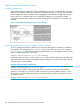
In the default stacking configuration, when a Candidate joins a stack, it automatically becomes a
Member of any SNMP community to which the Commander belongs, even though any community
names configured in the Commander are not propagated to the Member's SNMP Communities
listing. However, if a Member has its own (optional) IP addressing, it can belong to SNMP
communities to which other switches in the stack, including the Commander, do not belong. For
example:
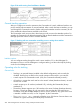
Figure 73 An SNMP community operation with stacking
SNMP management station access to members via the Commander
To use a management station for SNMP Get or Set access through the Commander's IP address
to a Member, you must append @sw switch number to the community name. For example, in
Figure 73 (page 290), you would use the following command in your management station to access
Switch 1's MIB using the blue community:
snmpget MIB variable 10.31.29.100 blue@sw1
Because the gray community is only on switch 3, you could not use the Commander IP address for
gray community access from the management station. Instead, you would access switch 3 directly
using the switch's own IP address.
Example 184 Commander IP addressing
snmpget MIB variable 10.31.29.15 gray
You cannot use the public community through the Commander to access any of the Member
switches. For example, you can use the public community to access the MIB in switches 1 and 3
by using their unique IP addresses. However, you must use the red or blue community to access
the MIB for switch 2.
snmpget MIB variable 10.31.29.100 blue@sw2
290 Stack management for the 3500, 3500yl, 6200yl and 6600 switches