
Advanced Traffic Management Guide K/KA/KB.15.15

Using a deterministic method
1. Install a Stacking Module into an HP 3800 switch and then boot the switch, as described in
the HP 3800 Switch Installation and Getting Started Guide.
2. Make sure that stacking is enabled for the switch:
a. Enter the show stacking command.
b. If stacking is disabled, enter stacking enable (in global config context). This command
causes the switch to reboot.
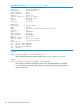
3. When the switch finishes booting, enter the show stacking command again. The switch
now has the status of Commander. It has a Member ID of 1 (one) and a default priority of
128.
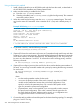
Example 185 Viewing show stacking output
HP Stack 3800#: show stacking
Stack ID : NO ID - will merge upon connectivity
MAC Address : 1cc1de-4d48c0
Stack Topology : No Stack Formed
Stack Status : No Stack Formed
Uptime : 0d 0h 5m
Software Version : KA.15.03
Mbr
ID Mac Address Model Pri Status
--- ------------- ------------------------------------- --- -------
1 1cc1de-4d48c0 HP J9574A 3800-48G-PoE+-4SFP+ Switch 128 Commander
4. To generate a stack ID, enter the following command:
HP Switch(config)#:stacking set-stack
5. (Optional) To have this switch retain its function as Commander through stack boots and other
situations, you can increase its priority. The switch with the highest priority becomes Commander
when all the switches are booted simultaneously. The default priority is 128. The priority can
be set to any value between 1 and 255. To increase the switch’s stacking priority, enter the
following command:
HP Switch(config)#: stacking member 1 priority 255
6. (Optional) Pre-configure (provision) the stack for the other switches that become members of
the stack. You can assign a member number and a priority by entering the following command
for each switch:
HP Switch(config)#: stacking member N type JxxxxA [mac
MAC-Addr]
where:
• N is the stacking member number for the switch
• JxxxxA is the product number of the switch (required). Any of the HP 3800
models can be installed and assume this provisioned configuration. If you
specify a value for this parameter, then only a switch of this specific model
type can assume this provisioned configuration
• (Optional) MAC-Addr can be specified if you want a specific switch to assume
this provisioned configuration. If this value is entered, then the type value for
the switch that has this MAC address must be correct, or a configuration error
is logged and the switch is not allowed to join the stack.
7. Connect the stacking cables to the module ports for the desired stacking topology. For example,
plug port 1 and 2 in a ring.
292 Stack management for the 3800 switches