
Advanced Traffic Management Guide K/KA/KB.15.15

8. Install Stacking Modules into the other switches that will be members of the stack, but do not
boot them yet.
NOTE: It is highly recommended that you create a mesh topology for maximum throughput
and resiliency of the stack. At a minimum, a ring topology should be created. A chain topology
is not recommended because any hardware or software failure in the stack results in lost ports,
which increases the amount of time for the recovery of full stack operation due to multiple
reboots. See the HP 3800 Installation and Getting Started Guide for supported topologies.
9. Boot the Standby and Member switches. The second switch that is booted becomes the Standby.
The remaining switches become Members when booted.
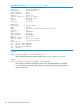
10. When all of the switches are booted, enter the show stacking command to confirm that
the stack is operating correctly. The following example shows four switches in a meshed
topology.
Example 186 Viewing output for four switches in a mesh topology
HP Stack 3800#: show stacking
Stack ID : 00031cc1-de4d48c0
MAC Address : 1cc1de-4d48c9
Stack Topology : Mesh
Stack Status : Active
Uptime : 1d 2h 35m
Software Version : KA.15.05
Mbr
ID Mac Address Model Pri Status
--- ------------- -------------------------------------- --- ---------------
1 1cc1de-4d48c0 HP J9574A 3800-48G-PoE+-4SFP+ Switch 250 Commander
2 1cc1de-4d8680 HP J9573A 3800-24G-PoE+-2SFP+ Switch 230 Standby
3 1cc1de-4e3180 HP J9574A 3800-48G-PoE+-4SFP+ Switch 128 Member
4 78acc0-3c2180 HP J9576A 3800-48G-4SFP+ Switch 128 Member
Using the plug-and-go method
1. Install a Stacking Module into an each HP 3800 switch that will be in the stack, as described
in the HP 3800 Switch Installation and Getting Started Guide, but do not connect them together
with stacking cables yet
2. Make sure that stacking is enabled for each switch.
a. You can determine this by connecting a console to each switch and entering the command
show stacking from the switch CLI.
b. If stacking is disabled, enter the command stacking enable. This command causes
the switch to reboot.
NOTE: By default, stacking is enabled on all the HP 3800 switches when a Stacking Module
is installed before the switch is powered up for the first time, but if the switches were powered
up without a Stacking Module installed, then stacking is disabled
If you are connecting stacking cables during/after switch boot, then multiple stacks can form
(plug-and-go method).
3. Connect the stacking cables between the switches to form the desired stacking topology, then
power on all switches.
When the switches that are stacked together complete booting up, one of the switches is elected
as the Commander, one of the switches is elected as the Standby, the remaining switches become
Members of the stack, and the stack becomes fully operational.
To find out the roles of the switches in the stack, connect a console to any of the switches and enter
the show stacking command. You can use the MAC address and other information in the
display to determine the roles of each of the switches.
Configuring a stack 293