
Advanced Traffic Management Guide K/KA/KB.15.15



The stack ports for the new switch appear online, however, the show stacking command shows
that the switch has not been recognized.
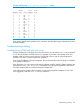
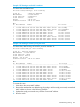
Example 200 Viewing the switch is not recognized
HP Stack 3800(config)#: show stacking stack-ports member 1,2
Member 1
Member Stacking Port State Peer Member Peer Port
------ -------------- ----- ------------- -------
1 1 Down 0 0
1 2 Up 2 1
1 3 Down 0 0
1 4 Down 0 0
Member 2
Member Stacking Port State Peer Member Peer Port
------ -------------- ----- ------------- -------
2 1 Up 1 2
2 2 Up 0 0
2 3 Down 0 0
2 4 Down 0 0
The show stacking command does not show that the member is “Not Joined.”
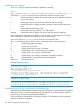
A log file indicates that a “topo /hello” was seen from a switch that was not part of the current
stack ID. The console of the switch that should have been member 3 shows the following example
output.
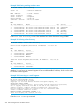
Example 201 Viewing output trom the “not joined” switch
HP Stack 3800#: show stacking
Stack ID : 00011cc1-de4dbd40
MAC Address : 1cc1de-4dbd64
Stack Topology : Unknown
Stack Status : Active
Uptime : 0d 0h 1m
Software Version : KA.15.05.0000x
Mbr
ID Mac Address Model Pri Status
--- ------------- --------------------------------- --- -------------------
1 1cc1de-4dbd40 HP J9575A 3800-24G-2SFP+ Switch 128 Commander
The output is different if you have an inactive fragment, since this switch can have the configuration
from an old stack. In this case, it might be inactive and show ‘missing’ switches from the old
configuration. The stack-id value does not match the stack ID of the HP Stack 3800 stacking factory
reset.
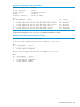
HP Stack 3800#: stacking factory-reset
Configuration will be deleted and device rebooted,continue [y/n]?
Y
To join this switch to the other stack, execute the stacking factory-reset command to erase
all of the stale stacking configuration information. This command automatically reboots the switch
and on its subsequent boot, the switch is able to join the new stack.
Troubleshooting stacking 309