
Advanced Traffic Management Guide K/KA/KB.15.15




Troubleshooting logging
The show logging command troubleshoots problems in stacking.
Syntax
show logging <a|b|r|s|t|m|p|e|w|i|d|filter|option-str|substring ...]>
The options a|r|substringcan be used in combination with an event class option.
a Instructs the switch to display all recorded log events, which includes events from
previous boot cycles.
b Display log events as time since boot instead of date/time format.
r Instructs the switch to display recorded log events in reverse order (most recent
first.)
s Display AMM and SMM log events.
t Display log events in granularity in 10 milli seconds.
substring Instructs the switch to display only those events that match the substring.
The remaining event class options are listed in order of severity - lowest severity first. The output
of the command is confined to event classes of equal or higher severity.
Only one of options d|i|w|e|p|m can be used in the command at a time.
The a|r and substring options may be used in combination with an event class option.
m Display major type of messages.
e Display error event class.
p Display major and error type of messages.
w Display major, error and warning type of messages.
I Display major, error, warning and information.
d Display major, error, warning, information and debug messages.
filter Display log filter configuration and status information.
Option-str Filter events shown.
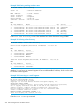
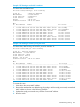
Example 202 Show logging –e
HP-5406zl$ Show logging –e
Keys: W=Warning I=Information
M=Major D=Debug E=Error
---- Event Log listing: Events Since Boot ----
M 10/04/13 11:01:21 00686 system: Test - This message was sent in a group 00000
E 10/04/13 11:01:21 00686 system: Test - This message was sent in a group 00001
---- Bottom of Log : Events Listed = 2 ----
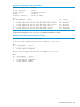
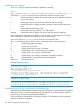
Example 203 Logging output
HP Stack 3800 #: show logging -r -s
I 10/02/00 00:46:56 02558 chassis: ST1-STBY: Stack port 3 is now on-line.
I 10/02/00 00:46:56 02558 chassis: ST2-CMDR: Stack port 2 is now on-line.
Troubleshooting a strictly provisioned, mismatched type
When the MAC address matches a strictly provisioned configuration, it either matches the configured
type and succeeds, or it does not match the type and fails. This is because the MAC address is
unique and you cannot have duplicate MAC addresses.
The log messages indicate that this was the type of failure. The information in the log message
helps you correct the configuration.
310 Stack management for the 3800 switches