
Advanced Traffic Management Guide K/KA/KB.15.15

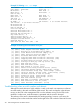


The switch that fails to join automatically reboots. Execute the show stacking command to view
the mis-configured entry.
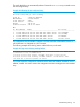
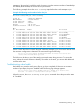
Example 204 Viewing the mis-configured entry
HP Stack 3800(config)#: show stacking
Stack ID : 00011cc1-de4d87c0
MAC Address : 1cc1de-4d87e5
Stack Topology : Mesh
Stack Status : Active
Uptime : 4d 0h 2m
Software Version : KA.15.05.0000x
Mbr
ID Mac Address Model Pri Status
--- ------------- ------------------------------------- --- ----------------
1 1cc1de-4d87c0 HP J9573A 3800-24G-PoE+-2SFP+ Switch 128 Commander
2 1cc1de-4dc740 HP J9573A 3800-24G-PoE+-2SFP+ Switch 128 Standby
3 1cc1de-4dbd40 HP J9575A 3800-24G-2SFP+ Switch 128 Member
4 1cc1de-4d79c0 HP J9576A 3800-48G-4SFP+ Switch 175 Member
5 1cc1de-4da900 HP J9575A 3800-24G-2SFP+ Switch 128 Not Joined
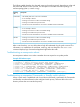
The configuration entry for member 5 matches a J9576A switch that will be added, however, it
will fail because it is configured as a J9575A switch.
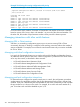
The following example shows the log entries with the failure to join the stack.
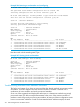
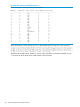
Example 205 Log entries Viewing stacking failures
W 10/06/00 03:24:37 03255 stacking: ST2-STBY: Provisioned switch with Member ID
5 removed due to loss of communication
I 10/06/00 03:24:37 02558 chassis: ST2-STBY: Stack port 4 is now on-line.
I 10/06/00 03:24:35 02558 chassis: ST4-MMBR: Stack port 2 is now on-line.
W 10/06/00 03:24:35 03274 stacking: ST1-CMDR: Member 5 (1cc1de-4da900) cannot
join stack due to incorrect product id: J9576A
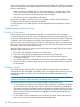
You cannot re-type the configuration command with the same MAC address, member ID, and a
different J-number. You need to remove the configuration and then reconfigure this switch member
entry.
Troubleshooting stacking 311