
Advanced Traffic Management Guide K/KA/KB.15.15
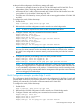

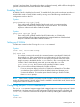
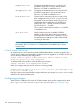

5. (Optional) Assign priorities to traffic passing through the provider network.
CAUTION: A reboot is required to enable/disable QinQ operations on the switch. When moving
between QinQ modes (qinq mixedvlan to qinq svlan or vice versa), the switch boots up
with a default configuration for the new qinq mode and the configuration parameters of the current
mode will be erased.
QinQ Configuration example
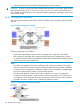
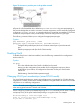
This configuration example uses four HP switches to establish a QinQ tunnel through the provider
network.
Figure 76 QinQ configuration example
The design parameters are as follows:
• The provider edge bridge and the provider core bridge are configured in svlan mode.
• Each customer is associated with a single S-VLAN connecting two separate sites: customer
A's VLANs (C-VLANs 1-10) are associated with S-VLAN 100; and customer B's VLANs (C-VLANs
1-20) are associated with S-VLAN 200.
NOTE:
• The VLANs of customers A and B can overlap: this will not result in intermixing of customer
frames in the provider cloud because the S-VLANs associated with each customer are different.
• Core devices are not mandatory to establish a QinQ tunnel. For example, two edge-bridges
can be connected directly to create a provider bridge network.
• The relationship between S-VLANs and C-VIDs is typically one to many. An alternative
configuration might associate a single customer's C-VIDs with more than one S-VLAN. Such
a configuration would most likely be used to tunnel distinct C-VIDs through various S-VLANs,
but seldom be used to send the same C-VID through multiple S-VLANs.
Figure 77 Configuration example: Edge Switch 1
324 QinQ (Provider bridging)