
Advanced Traffic Management Guide K/KA/KB.15.15
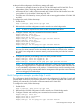


Edge2(config)#: svlan 200
Edge2(svlan-200)#: untagged A2
Edge2(svlan-200)#: exit
Edge2(config)#: int A2 qinq port-type customer-network
4. Configure the provider ports leading to the core of the provider network.
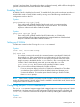
Edge1(config)#: svlan 100 tagged A3, A4
Edge1(config)#: svlan 200 tagged A3, A4
Edge1(config)#: interface A3,A4 qinq port-type provider-network
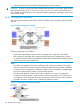
Configuring example: provider core 1 switch
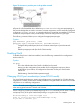
Figure 78 Configuration example: Core 1 Switch
To configure the Core 1 switch:
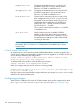
1. Enable QinQ:
Core l(config)#: qinq svlan tag-type 88a8
2. Reboot the box with the configuration saved to transfer into svlan bridge mode.
3. Configure S-VLANs and port assignments.
Core 1(config)#: svlan 100
Core 1(svlan-100)#: tagged A1, A2
Core 1(svlan-100)#: exit
Core 1(config)#: svlan 200
Core 1(svlan-200)#: tagged A1, A2
Core 1(svlan-200)#: exit
Core 1(config)#: interface A1,A2 qinq port-type provider-network
NOTE: The S-VLAN configuration for the core devices is based on what VLANs the edge devices
(Edge 1 and 2) can send. Per the 802.1ad specification, all ports carrying customer traffic will be
tagged on the VLAN that the port carries customer frames on.
To configure the Core 2 switch:
1. Enable QinQ:
Core 2(config)#: qinq svlan tag-type 88a8
2. Reboot the box with the configuration saved to transfer into svlan bridge mode.
3. Configure S-VLANs and port assignments.
Core 2(config)#: svlan 100
Core 2(svlan-100)#: tagged A1, A2
Core 2(svlan-100)#: exit
Core 2(config)#: svlan 200
Core 2(svlan-100)#: tagged A1, A2
Core 2(svlan-100)#: exit
Core 2(config)#: interface A1,A2 qinq port-type provider-network
Verifing the configuration
After the edge and core switch configurations are completed, QinQ operations can begin. To
verify operations, it should be possible to assign IP-addresses to customer A or B devices in site 1
326 QinQ (Provider bridging)