
Advanced Traffic Management Guide K/KA/KB.15.15

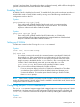
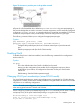

and site 2 and ping them. If everything has been configured correctly, traffic will flow through the
provider network cloud and reach the other site seamlessly.
Enabling QinQ
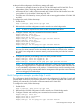
By default, QinQ is disabled on the switch. To enable QinQ, the switch must be put into either in
mixed VLAN mode or QinQ SVLAN mode by issuing one of the following commands from
configuration mode on the CLI.
Syntax:
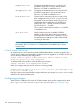
qinq mixedvlan tag-type [tpid]
From config mode, globally enables QinQ mixed mode, an environment that
supports both S-VLAN and C-VLAN traffic on the same device. This command
requires a reboot to take effect. Default: Disabled.
Syntax:
qinq svlan tag-type [tpid]
From config mode, globally enables QinQ SVLAN mode, an S-VLAN only
environment that supports supports port-based or s-tagged interfaces of the standard.
Requires a reboot to take effect. Default: Disabled.
Setting up S-VLANs
S-VLANs are created via the CLI using the svlan vid command.
Syntax:
svlan vid | ascii-name-string
[no] svlan vid
If vid does not exist in the switch, this command creates a port-based S-VLAN with
the specified vid. If the command does not include options, the CLI moves to the
newly created S-VLAN context. If you do not specify an optional name, the switch
assigns a name in the default format: svlan where n is the vid assigned to the
S-VLAN. If the S-VLAN already exists and you enter either the vid or the
ascii-name-string, the CLI moves to the specified S-VLAN's context.
The no form of the command deletes the S-VLAN as follows:
• If one or more ports belong only to the S-VLAN to be deleted, the CLI notifies
you that these ports will be moved to the default VLAN and prompts you to
continue the deletion. For member ports that also belong to another S-VLAN,
there is no move prompt.
NOTE: When QinQ is disabled, all VLANs must be C-VLANs. When QinQ is enabled in SVLAN
mode, all VLANs must be S-VLANs. When QinQ is enabled in mixed VLAN mode, VLANs can be
configured as either C-VLANs or S-VLANs.
Configuring per-port S-VLAN membership
The svlan vid command supports tagged and untagged options to configure per-port S-VLAN
memberships. Use these options from the configuration level by beginning the command with
svlan vid , or from the context level of the specific VLAN by entering the command option.
Syntax:
svlan vid
Enabling QinQ 327