
Advanced Traffic Management Guide K/KA/KB.15.15

About QinQ
Operating rules and guidelines
This section provides an overview of QinQ operations and restrictions on the switch.
Enabling QinQ and configuring QinQ modes
By default, QinQ is disabled. WhenQinQ is enabled via the CLI, an operating mode is globally
configured on the switch. Two QinQ modes are supported:
qinq mixedvlan C-VLANs and S-VLANs are both supported, with regular switching/routing
based on C-VLAN tags in the C-VLAN domain, while S-VLANs are used
for QinQ tunneling through the provider network.
qinq svlan C-VLANs are not supported on the device. All configured VLANs on the
switch must be S-VLANs.
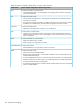
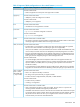
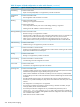
The following table shows how the various QinQ modes and operations impact VLAN configuration
options on the switch.
Table 32 Relationship of QinQ operating modes to VLAN environments
VLAN OptionsCLI CommandQinQ Operation
QinQ disabled
Only regular VLAN
commands are available.
no qinqNo QinQ support
(Default)
If QinQ is disabled,
S-VLAN commands are not
available.
QinQ enabled
Both S-VLAN and regular
VLAN commands (known
qinq mixedvlanQinQ mixed VLANmode
as C-VLANs in a mixed
vlan environment) are
available.
No regular VLAN
commands are available.
qinq svlanQinQ S-VLAN mode
All VLANs configured on
the switch are S-VLANs
only.
QinQ mixed VLAN mode
The QinQ mixed VLAN mode configuration supports both C-VLAN and S-VLAN operations on the
same device. This allows the use of S-VLAN member ports for QinQ tunneling, while regular ports
can still do switching or routing within the C-VLAN space. To tunnel customer frames through the
provider network, you can externally connect a regular port to a customer-network port, eliminating
the need for a separate S-VLAN bridge device to perform such operations. When configuring
VLANs on a mixed VLAN mode device, a separate svlan vid command is used to distinguish
the S-VLAN type from regular VLANs.
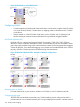
The main advantage for QinQ mixed VLAN mode is that users do not have to dedicate the entire
switch as a QinQ access switch. For a high density chassis switch such as the 5400zl or 8200zl
series, customers can use regular ports for normal LAN switching, while S-VLAN member ports can
be configured to access the QinQ provider network (see Figure 76 (page 324)). There are some
additional restrictions in mixed-VLAN mode.
About QinQ 333