
Advanced Traffic Management Guide K/KA/KB.15.15

ports will be configured as untagged members of S-VLANs while provider-network ports will be
configured as tagged members of S-VLANs. Note the following configuration rules and guidelines:
• All ports of a device that is QinQ enabled (in S-VLAN mode or mixed VLAN mode) are
provider-network ports by default—if there are any ports that connect to a customer device,
they must be manually configured as customer-network ports.
• Configuring a port-type is applicable only if the device is QinQ enabled and the port is a
member of an S-VLAN. In QinQ mixed mode, ports that are members of C-VLANs cannot be
configured to any port-type.
NOTE: If a device running in QinQ S-VLAN mode has one or more customer-network ports, it is
considered to be a provider edge and not a provider core bridge. This may affect certain operations,
such as meshing, UDLD, and stacking. This is because at the edge of the provider network such
proprietary protocol are filtered out at customer network ports. This prevents the intermix of stacking
meshing/UDLD protocols in the customer and provider domains (since they use the same dst-mac
address in either domain).
Operating notes and restrictions
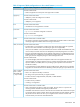
Cannot run concurrently with RPVST+ QinQ cannot run concurrently with RPVST+
Changing bridge modes requires a
reboot
When changing the operating mode (to/from: QinQ S-VLAN
mode, QinQ mixed VLAN mode, or QinQ disabled), you
will prompted to restart the system before the changes can
take effect. Upon reboot, all configuration information for
the prior QinQ mode will be lost. Any configurations created
will be erased, and the device will boot up with a default
configuration for the new QinQ mode.
Provider edge devices at Layer 2 only QinQ does not provide Layer 3 capabilities of complete
network isolation between customers. In a mixed VLAN
configuration, there is no switching/routing between
C-VLANs and S-VLANs. S-VLANs are essentially Layer 2
VLANs that switch packets based on S-VIDs.
IP support Regular VLANs support IP and can be routing enabled.
S-VLANs of mixed VLAN mode devices cannot be ip
enabled. S-VLANs of S-VLAN mode devices can be
ip-enabled, though routing related features (such as ip
routing) are not supported.
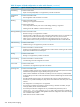
Double-tagging causes frame size
increases
Since there is both a provider VLAN tag and customer VLAN
tag in each QinQ frame, the size of each double-tagged
frame increases by 4 bytes. To accommodate the frame size
increase, HP recommends that you configure all port-based
S-VLANs to accept jumbo frames.
S-VLAN configuration restrictions S-VLAN commands are not available when QinQ is disabled
on the switch.
About QinQ 335