
Advanced Traffic Management Guide K/KA/KB.15.15


10 Classifier-based software configuration
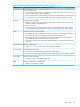
NOTE: All commands previously in the Summary of commands table are indexed under the entry
Command syntax.
Introduction
Classifier-based service policies are designed to work with existing globally configured switch-wide
and port-wide settings by allowing you to select a subset of:
• Traffic sent to or from certain ports
• VLAN traffic
Once the traffic is selected, you can further manage it.
Classifier-based service policies take precedence over, and may override, globally configured
settings. These policies provide greater control for managing network traffic. Using multiple match
criteria, you can finely select and define the classes of traffic that you want to manage. You can
then use policy actions to determine how the selected traffic is handled.
Classes can be based on IPv4 or IPv6 addresses (which you specify in the policy).
When using an HP AllianceONE Extended Services zl Module that supports Transparent Mode,
you can also classify traffic based on zones.
Configuring a traffic class
To configure a traffic class to be used in one or more policies, follow these steps:
1. Enter the class command from the global configuration context.
Context: Global configuration
Syntax:
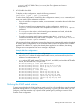
[no] class [ ipv4 | ipv6 ] classname
Defines a traffic class and specifies whether a policy is to be applied to IPv4 or
IPv6 packets, where classname is a text string (64 characters maximum).
After you enter the class command, you enter the class configuration context to
specify match criteria. A traffic class contains a series of match and ignore
commands, which specify the criteria used to classify packets.
The no form of the command removes the existing class
2. Enter one or more match or ignore commands from the traffic class configuration context
to filter traffic and determine the packets on which policy actions will be performed.
Context: Class configuration
Syntax:
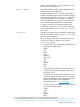
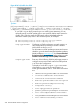
[no] [seq—number] [ match | ignore ] igmp source—address
destination—address [ igmp—type ] [ ip—dscp codepoint ] [ precedence
precedence—value ] [ tos tos—value ] [ vlan vlan—id ]
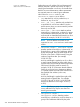
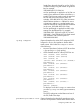
seq-number (Optional) Sequentially orders the match/ignore
statements that you enter in a traffic class configuration.
Packets are checked by the statements in numerical
order.
Default: Match/ignore statements are numbered in
increments of 10, starting at 10. To re-number the
342 Classifier-based software configuration