
Advanced Traffic Management Guide K/KA/KB.15.15


101010), and ToS/Traffic Class (10101000) bits. The rightmost two bits are
reserved as 00.
3. A ToS/traffic class field.
To display a class configuration, enter the following command.
show class [ ipv4 | ipv6 ] [classname]
To edit a class configuration, re-enter the class configuration context (class command) and
enter new match/ignore statements as follows:
• If you do not enter a sequence number, a new statement is inserted at the end of the class
configuration.
• To remove a match/ignore statement from a class configuration, enter the no
sequence-number command or the complete form of the no match or no ignore
command.
• To resequence the order in which match/ignore statements are listed, include the
resequence option in the class command.
• To replace an existing match/ignore statement, enter the no sequence-number
command to delete the entry and re-enter a complete sequence-number match or
sequence-number ignore command.
When exiting the class configuration context, the changes are automatically saved and applied
to existing policy configurations on the switch that use the class if the policies have not been
applied to an interface. If a policy has already been applied to an interface, the editing
changes are not accepted and an error message is displayed.
Example 218 Class configurations
The following example shows two class configurations:
• AdminTraffic selects the administrative traffic sent to, and received from, the IPv4
address of an administrator's PC.
• http selects HTTP traffic sent to TCP ports 80, 443, and 8080, and excludes HTTP traffic
sent to, and received from, TCP port 1214.
HP Switch(config)#: class ipv4 AdminTraffic
HP Switch(config-class)#: match ip 15.29.16.1/10 any
HP Switch(config-class)#: match ip any 15.29.16.1/10
HP Switch(config-class)#: exit
HP Switch(config)#: class ipv4 http
HP Switch(config-class)#: match tcp any any eq 80
HP Switch(config-class)#: match tcp any any eq 443
HP Switch(config-class)#: match tcp any any eq 8080
HP Switch(config-class)#: ignore tcp any eq 1214 any
HP Switch(config-class)#: ignore tcp any any eq 1214
HP Switch(config-class)#: exit
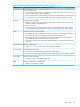
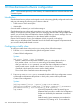
Defining the ICMP match criteria
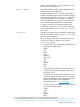
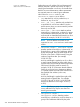
To more precisely define the ICMP packets to match in an IPv4 or IPv6 traffic class, use the optional
parameter settings below. For example, instead of matching or ignoring all ICMP traffic, you can
configure a class that matches only a specific ICMP packet type by entering its numeric value.
Context: Class configuration
Defining the ICMP match criteria 347