
Advanced Traffic Management Guide K/KA/KB.15.15

Syntax
[no]interface <port-list> <tagged | untagged | forbid> <vlan
| svlan <vlan-id-list>>
• The specified interfaces are added to existing VLANs or SVLANs. If a VLAN
or SVLAN does not exist, an error message displays.
• The [no] option removes the specified interfaces from the specified VLANs or
SVLANs.
• The forbid option prevents an interface from becoming a member of the
specified VLANs or SVLANs. It is executed in interface context.
Example 21 Removing an interface from several VLANs
The vlan-id-list includes a comma-separated list of VLAN IDs and/or VLAN ID ranges.
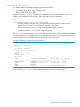
Example 22 To remove interface 1 from VLANs 1, 3, 5, 6, 7, 8, 9, 10
HP Switch(config)#: no interface 1,6,7-10 tagged vlan 1,3,5-10
Example 23 To specify that an interface cannot become a member of VLANs 4 and 5
HP Switch(config)#: interface 2 forbid vlan 4-5
Connecting an HP Switch to another with a multiple forwarding database
(Example)
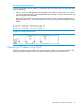
Example 24 Example
Use one or both of the following connection options:
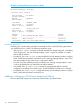
• A separate port or port trunk interface for each VLAN. This results in a forwarding database
having multiple instances of the same MAC address with different VLAN IDs and port numbers.
See Table 4 (page 52). The fact that the switches covered by this guide use the same MAC
address on all VLAN interfaces causes no problems.
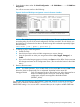
• The same port or port trunk interface for multiple (tagged) VLANs. This results in a forwarding
database having multiple instances of the same MAC address with different VLAN IDs, but
the same port number.
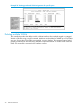
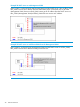
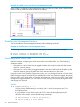
Allowing multiple entries of the same MAC address on different VLANs enables topologies such
as the following:
Example 25 A valid topology for devices having multiple forwarding databases in a multiple VLAN
environment
Connecting an HP Switch to another with a multiple forwarding database (Example) 35