
Advanced Traffic Management Guide K/KA/KB.15.15
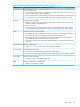

Syntax:
[no] [seq—number] [ match | ignore ] igmp source—address destination—address
[ igmp—type ] [ ip—dscp codepoint ] [ precedence precedence—value ] [ tos
tos—value ] [ vlan vlan—id ]
If you enter igmp as the IP protocol type in a match/ignore statement, you can
optionally specify an IGMP packet type to more precisely define match criteria for
a traffic class. Enter the optional IGMP match criteria immediately after the
destination IP address (DA) value in the command syntax; for example:
HP Switch(config-class)#: match igmp any any host-query
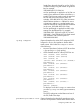
igmp-typeConfigures an IGMP packet type as match criteria in a class configuration. Some
of the valid values for IGMP packet-type names are as follows:
• dvmrpmtrace-requesttrace
• host-querymtrace-replyv2-host-leave
• host-reportpimv2-host-report
• v3-host-report
To display a list of valid igmp-type entries when you enter igmp
as the IP protocol type in a match/ignore statement, enter ?.
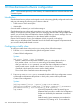
Defining TCP and UDP match criteria
In a class configuration, you can enter match/ignore statements that more precisely define the TCP
or UDP traffic to match in an IPv4 or IPv6 traffic class. For example, enter a port number as a match
criterion that specifies one or more TCP source ports, destination ports, or both.
Context: Class configuration
Syntax:
[no] [ seq—number ] [ match | ignore ] tcp | udp source—address [ operator
tcp—src—port | udp—src—port ] destination—address [ operator tcp—dest—port
[established] [tcp—flag tcp—flag ... ] udp—dest—port ] [ ip—dscp
codepoint ] [ precedence precedence—value ] [ tos tos—value ]
[ vlan vlan—id ]
If you use TCP or UDP as the IP protocol type in a match/ignore statement, you can
optionally configure TCP or UDP source and destination port numbers or ranges of
numbers to more precisely define match criteria for a traffic class. Enter the optional
TCP/UDP match criteria immediately after the source and destination address in
the command syntax; for example:
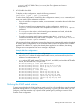
HP Switch(config-class)#: match tcp host 10.20.10.17 eq 23 host 10.20.10.155
established
HP Switch(config-class)#: match tcp host 10.10.10.100 host 10.20.10.17 eq telnet
HP Switch(config-class)#: ignore udp 10.30.10.1/24 host 10.20.10.17 range 161 162
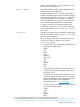
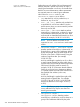
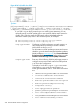
operator tcp-src-port |
udp-src-port
To specify a TCP or UDP source port number
as a match criteria, enter a comparison
operator from the following list with a
TDP/UDP port number or well-known port
name immediately after the source-address
value in the command.
Comparison Operators:
• eq tcp/udp-port-number
350 Classifier-based software configuration