
Advanced Traffic Management Guide K/KA/KB.15.15

Configuring a secure Management VLAN
Preparation
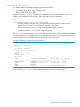
1. Determine a VID and VLAN name suitable for your Management VLAN.
2. Plan your topology to use HP switches that support Management VLANs.
3. Include only the following ports:
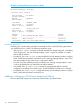
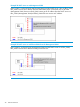
• Ports to which you will connect authorized management stations, such as Port A7 in
Example 46 (page 58).
• Ports on one switch that you will use to extend the Management VLAN to ports on other
HP switches, such as ports A1 and Example 46 (page 58).
4. Half-duplex repeaters dedicated to connecting management stations to the Management VLAN
can also be included in this topology. Note that any device connected to a half-duplex repeater
in the Management VLAN will also have Management VLAN access.
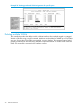
5. Configure the Management VLAN on the selected switch ports.
6. Test the Management VLAN from all of the management stations authorized to use it, including
any SNMP-based network management stations. Also test any Management VLAN links
between switches.
NOTE: If you configure a Management VLAN on a switch using a Telnet connection through a
port not in the Management VLAN, you will lose management contact with the switch if you log
off your Telnet connection or execute write memory and reboot the switch.
Configuring an existing VLAN as the Management VLAN
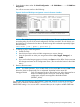
Syntax:
[no] management-vlan [ vlan-id | vlan-name ]
Configures an existing VLAN as the Management VLAN.
The no form disables the Management VLAN and returns the switch to its default
management operation.
Default: Disabled. In this case, the VLAN returns to standard VLAN operation.
36 Static Virtual LANs