
Advanced Traffic Management Guide K/KA/KB.15.15

11 Smart Link
NOTE: All commands previously in the Summary of commands table are indexed under the entry
Command syntax.
Configuration commands
Create a smart link group
Create a smart link group. When the command is entered without any parameters, it enters into
Smart link group context.
Syntax
HP-Switch(config)#[no] smart-link group <group-id>
Options
[master <Port>]
[slave <port>]
[protected-vlans <vid-list>]
[send-control-vlan <vid>]
[preemption-mode < off | forced | bandwidth>]
[preemption-delay <10-max>]
[trap <enable | disable>]
Configure vlans
Configure vlans to receive flush messages. This is an interface level command. It must be executed
for both the master and the slave port.
Syntax
HP-Switch(config)#[no] smart-link recv-control-vlan <vid-list>
Enable debug
Enable debug messages for a Smart link group.
Syntax
HP-Switch(config)#[no] debug smart-link [group <<group-id> | all>]
[flush-packets]
Configuration example
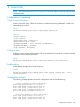
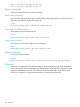
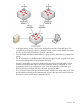
The following example illustrates Smart link configuration with vlan load-balancing:
vlans 1-10 mapped to smart-link group 1
smart-link group 1 master a1 slave a2
smart-link group 1 protected-vlans 1-10
smart-link group 1 send-control-vlan 1
smart-link group 1 preemption-mode role
smart-link group 1 preemption-delay 10
vlans 11-20 mapped to smart-link group 2
smart-link group 2 master a2 slave a1
smart-link group 2 protected-vlans11-20
smart-link group 2 send-control-vlan 10
Configuration commands 375