
Advanced Traffic Management Guide K/KA/KB.15.15
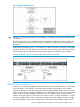


assignment restrictions. The folloiwng table illustrates the functional difference between the two
database types.
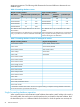
Table 4 Forwarding database content
Single forwarding databaseMultiple forwarding database
Destination portDestination
VLAN ID
MAC addressDestination portDestination VLAN
ID
MAC address
A91000004ea-84d9f4A510004ea-84d9f4
A101050060b0-880af9A12220004ea-84d9f4
A171070060b0-880a81A20440004ea-84d9f4
A20330060b0-880a81
This database allows only one destination for a MAC
address.
This database allows multiple destinations for the same
MAC address.
If the switch detects a new destination for an existing MAC
entry, it replaces the existing MAC instance with a new
instance showing the new destination.
If the switch detects a new destination for an existing MAC
entry, it just adds a new instance of that MAC to the table.
Table 5 Forwarding database structure for managed HP switches
Single forwarding databaseMultiple forwarding databases
Switch 1600M/2400M/2424MSeries 8200zl switches
Switch 4000M/8000MSwitch 6600
Series 2500 switchesSeries 6400cl switches
Switch 2000Switch 6200yl
Switch 800TSwitch 6108
Series 5400zl switches
Series 5300xl switches
Series 4200vl switches
Series 4100gl switches
Series 3800 switches
Series 3500 switches
Series 3500yl switches
Series 3400cl switches
Switch 2810
Series 2800 switches
Series 2600/2600-PWR switches
Series 2510 switches
*To determine whether other vendors' devices use single-forwarding or multiple-forwarding database architectures,
see the documentation provided for those devices.
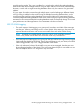
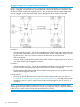
Single forwarding database operation
When a packet arrives with a destination MAC address that matches a MAC address in the switch's
forwarding table, the switch tries to send the packet to the port listed for that MAC address. But if
the destination port is in a different VLAN than the VLAN on which the packet was received, the
52 Static Virtual LANs