
Advanced Traffic Management Guide K/KA/KB.15.15


The secure Management VLAN
Configuring a secure Management VLAN creates an isolated network for managing the HP switches
that support this feature. Access to a secure Management VLAN and the switch's management
functions (Menu and CLI), is available only through ports configured as members.
• Multiple ports on the switch can belong to the Management VLAN. This allows connections
for multiple management stations to the Management VLAN, while allowing Management
VLAN links between switches configured for the same Management VLAN.
• Only traffic from the Management VLAN can manage the switch, which means that only the
workstations and PCs connected to ports belonging to the Management VLAN can manage
and reconfigure the switch.
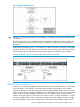
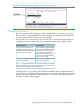
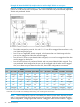
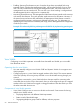
Example 45 Potential security breaches in a network
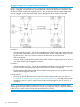
This illustrates use of the Management VLAN feature to support management access by a group
of management workstations.
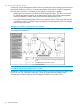
Example 46 Management VLAN control in a LAN
Workstation 1 has management access to all three switches through the Management VLAN, while
the PCs do not. This is because configuring a switch to recognize a Management VLAN
automatically excludes attempts to send management traffic from any other VLAN.
58 Static Virtual LANs