
Advanced Traffic Management Guide K/KA/KB.15.15


3. Display the configuration files as shown in the following example. Note the newly created
configuration file listed.
HP Switch(config)#: show config files
Configuration files:
id | act pri sec | name
---+-------------+----------------------
1 | * * * | config1
2 | | config2
3 | | configK1243.cfg
4. Update the switch to the desired version, for example, K.12.51. Enter the show flash
command to see the results. The switch is now running the software version K.12.51.
HP Switch(config)#: show flash
Image Size(Bytes) Date Version Build #:
----- ---------- -------- ------- -------
Primary Image : 6771179 04/17/08 K.12.51 304
Secondary Image : 7408949 11/06/08 K.12.43 123
Boot Rom Version: K.12.12
Default Boot : Primary
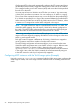
5. To run the prior software version (K.12.43 in this example), enter this command:
HP Switch(config)#: boot system flash secondary config configK1243.cfg
After rebooting, the switch is running software version K.12.43 and is using the configuration
file that you saved for this software version, configK1243.cfg.
You can also save the K.12.43 configuration file on a TFTP server. To reload the K.12.43
version of the software again, reload the configuration file before doing the reload.
Viewing MSTP statistics
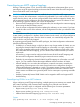
NOTE: SNMP MIB Support for MSTP is a superset of the STP/802.1D and RSTP/802.1w protocols
and uses the MIB objects defined for these two protocols.
Viewing global MSTP status
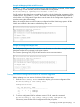
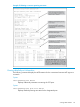
The following commands display the MSTP statistics for the connections between MST regions in
a network.
Syntax:
show spanning-tree
Displays the switch's global and regional spanning tree status, plus the per-port
spanning tree operation at the regional level. Values for the following parameters
appear only for ports connected to active devices: Designated Bridge, Hello
Time, PtP, and Edge.
Syntax:
show spanning-tree port-list
Dsplays the spanning tree status for the designated ports. You can list data for a
series of ports and port trunks by specifying the first and last port or trunk of any
consecutive series of ports and trunks. For example, to display data for port A20-A24
and trk1, you would use this command: show spanning-tree a20-a42,trk1
98 Multiple instance spanning tree operation