
HP Power over Ethernet (PoE/PoE+) Planning and Implementation Guide


11-15
Planning and Implementation for the HP 3500-PoE yl Switches
Planning the PoE or PoE+ Configuration
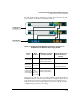
It takes 330 watts to fully provision 11 ports (plus 5 watts to account for load
fluctuations), leaving 19 watts to be returned to the pool of available watts.
This can then be added to the 22 watts held in reserve for the bank of ports
25-48, giving a total of available watts of 41 watts.
Since a port requires 33 watts to power up a PoE+ device, there is not enough
available power to power another device.
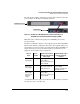
Another example would be to load balance or split the number of devices and
wattage between the two banks of ports. In this example the total wattage of
398 would be divided in half, 199 watts would be allocated to ports 1-24, and
199 watts would be allocated to ports 25-48.
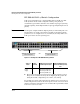
By load balancing in this manner there could be 6 devices on one bank of ports,
say 1-24, and 6 on the other bank of ports, 25-48.
Both of these examples use maximum device wattage. If however, devices
using lower wattages are connected there could be more devices connected
to the switch than shown in these examples. Each environment will be
different.
There is a CLI command available, the threshold command. It has an
informational only result. This command sets a threshold, by percent, to
inform you the switch is now using more than a certain percentage of PoE
power. For example if the threshold is set at 50%, the switch will issue an
information message informing you the switch has exceeded the threshold
when 51% of available PoE power is being used.For more information on the
threshold command, Refer to the Management and Configuration Guide for
your switch at www.hp.com/networking/support.