
HP Power over Ethernet (PoE/PoE+) Planning and Implementation Guide

9-2
Planning and Implementation for the HP 2920-PoE+ Switches
Introduction
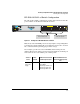
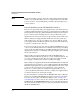
Note The dual-personality ports have either auto-sensing 10/100/1000Base-T RJ-45
or SFP+ connectivity. The SFP+ ports do not support PoE. If any of the SFP+
ports are used, the corresponding RJ-45 port will not provide PoE power to
connected devices.
Power Redundancy for the HP 2920-PoE+ Switches
There are two optional internal power supplies in these 2920-PoE+ switches,
a 575W model (J9738A) which provides up to 370W of PoE, and a 1050W model
(J9737A) which provides up to 740W of PoE. Both models provide both system
power to run the switch and PoE power for connected PDs. If the power
supply fails, both of these functions are stopped and the switch is shut down.
With the 575W power supply installed, the HP 2920 Switches provide up to
30W of PoE for up to 12 ports, or 15.4W for up to 24 ports. With the 1050W
power supply installed, the HP 2920 Switches can provide 30W of PoE for up
to 24 ports, or 15.4W for up to 48 ports.
To increase the PoE capacity of the switch, an HP 640 RPS/EPS Shelf can be
connected to the HP 2920 Switches for redundant switch system power (RPS)
and to provide for additional PoE+ power (EPS). The HP 640 has three power
supply bays into which you can install the same power supplies that you install
into the 2920 Switches.
With a 1050W power supply installed in the HP 640 RPS/EPS Shelf, an
additional 700W of PoE can be provided to a connected HP 2920 Switch. You
can connect an HP 2920 that has either the 575W power supply or 1050W
power supply to an HP 640 bay that has a 1050W power supply.
With a 575W power supply installed in the HP 640 RPS/EPS Shelf, an additional
370W of PoE can be provided to a connected HP 2920 Switch. The HP 640 RPS/
EPS Shelf design requires that the power supply installed in the 640 be equal
to or greater in power than the power supply in the connected switch.
Therefore, to a 640 bay that has a 575W power supply installed, you can
connect only HP 2920 Switches that also have a 575W power supply installed,
not switches that have the 1050W power supply.
For more information on using the HP 640 RPS/EPS Shelf with you HP 2920
Switches, see the HP 640 RPS/EPS Shelf Installation and Power Setup Guide.
You can locate that guide on the HP Networking web site, www.hp.com/
networking/support. Auto search on “640”, click the check box for the HP 640
RPS/EPS Shelf, click Display selected, and then click on the links that include
the word “manuals” in them to get to the web page that lists the manuals for
the HP 640 RPS/EPS Shelf.