
HP Switch zl2 Modules Installation Guide



12
Installing the Modules
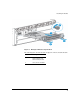
Figure 4. Module fully installed
Installing or Removing a SFP transceiver
You can install or remove a SFP transceiver from the SFP v2 zl Module without
having to power off the switch. Use only SFP transceivers.
WARNING The HP SFPs are Class 1 laser devices. Avoid direct eye exposure to the beam
coming from the transmit port.
Caution Use only supported genuine HP SFP transceivers with your switch. Non-HP
SFP transceivers are not supported, and their use may result in product
malfunction. Should you require additional HP SFP transceivers, contact your
HP networking Sales and Service Office or authorized dealer.
Installing the SFP transceivers:
Hold the transceiver by its sides and gently insert it into any of the slots in the
module until it clicks into place.