
HP Switch zl2 Modules Installation Guide





16
Installing the Modules
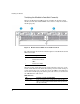
Connecting the Network Cables
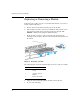
Connect the appropriate network cables to the module's ports as shown in
the table below. For more information on the cable specifications, see
“Cabling and Technology Specifications” on
page 27.
Note Automatic Cable Sensing on Twisted-Pair Ports:
When the ports for these v2 zl Modules are in their default configuration, Auto,
they automatically negotiate whether the ports operate as MDI or MDI-X,
depending on the cable type and the connected device’s operation. As a result,
you can use either straight-through or crossover twisted-pair cable for all
network connections to these modules.
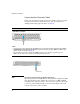
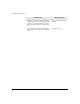
Module
10/100/1000-T PoE zl Module
Notes:
• The RJ-45 ports on this module have the Auto-MDIX feature. In the module’s default configuration, Auto, either a
straight-through or crossover cable can be used to connect the module to any other 1000Base-T, 100Base-TX or
10Base-T device. See the Note on page 16.
• Since the 10Base-T operation is through the 10/100Base-TX ports, if you ever want to upgrade the ports to
100Base-TX, it would be best to cable the ports initially with category 5 cable.
SFPs on the 10/100/1000-T zl Modules