
HP Switch zl2 Modules Installation Guide





20
Replacing or Removing a Module
Replacing or Removing a Module
Follow these procedures to replace one module with another, or to remove a
module without replacing it:
1. Remove any network cables from the ports on the module.
2. If the module you want to remove has a shutdown button, make sure to
shut down the module before removing it either by using the CLI
shutdown command or by using the shutdown button.
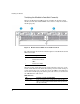
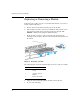
3. On the module you want to remove from the switch, unscrew the
retaining screws enough to disconnect them from the threaded holes in
the switch.
Figure 8. Removing a module
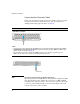
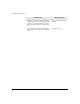
The following table shows label and description on how to remove a module:
4. Using the extractor handles pull the module out from the slot.
5. Do one of the following:
Label Description
1 Unscrew the retaining
screws.
2 Open the extractor
handles
3 Remove the module