
IPv6 Configuration Guide K/KA/KB.15.15



General steps for planning and configuring ACLs
1. Identify the ACL action to apply.
Determine the best points at which to apply specific ACL controls. For example, you can
improve network performance by filtering unwanted IPv6 traffic at the edge of the network
instead of in the core. Also, on the switch itself, you can improve performance by filtering
unwanted IPv6 traffic where it is inbound to the switch instead of outbound.
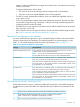
ACL applicationTraffic source
RADIUS-assigned ACL for inbound IPv6 traffic from an
authenticated client on a port
For more information, see chapter
"Configuring RADIUS Server Support for
Switch Services" in the latest version of the
Access Security Guide for your switch. See
also the documentation for your RADIUS
server.
IPv6 traffic from a specific, authenticated client
Static port ACL (static-port assigned) for inbound IPv6 traffic on
a port from any source
IPv6 traffic entering the switch on a specific port
VACL (VLAN ACL)Switched or routed IPv6 traffic entering the switch on
a specific VLAN
RACL (routed ACL)Routed IPv6 traffic entering or leaving the switch on a
specific VLAN
2. Identify the IPv6 traffic types to filter:
• The SA and/or the DA of IPv6 traffic you want to permit or deny; this can be a single
host, a group of hosts, a subnet, or all hosts.
• IPv6 traffic of a specific protocol type (0 to 255).
• TCP traffic (only) for a specific TCP port or range of ports, including optional control of
connection traffic based on whether the initial request should be allowed.
• UDP traffic (only) or UDP traffic for a specific UDP port.
• ICMP traffic (only) or ICMP traffic of a specific type and code.
• Any of the above with specific DSCP settings.
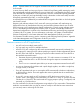
3. Design the ACLs for the control points (interfaces) you have selected. Where you are using
explicit "deny" or “permit” ACEs, you can optionally use the ACL logging feature for notification
that the switch is denying unwanted packets, or permitting packets that you want to go through.
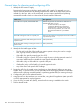
4. Configure the ACLs on the selected switches.
5. Assign the ACLs to the interfaces you want to filter, using the ACL application (static port ACL
or VACL) appropriate for each assignment.
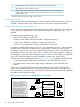
6. If you are using a routed ACL (RACL), ensure that IPv6 routing is enabled on the switch.
7. Test for desired results.
100 IPv6 Access Control Lists (ACLs)