
IPv6 Configuration Guide K/KA/KB.15.15

NOTE: The switch allows you to assign an "empty" ACL identifier to an interface.
If you later populate the empty ACL with one or more ACEs, it automatically becomes
active on the assigned interfaces. Also, if you delete an assigned ACL from the
running config file without also using the no form of this command to remove the
assignment to an interface, the ACL assignment remains and automatically activates
any new ACL you create with the same identifier.
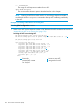
Example 70 Methods for enabling and disabling ACLs
HP Switch(config)# interface b10 ipv6 access-group List-1 in
1
HP Switch(config)# interface b10
HP Switch(eth-b10)# ipv6 access-group List-4 in
2
HP Switch(eth-b10)# exit
HP Switch(config)# no interface b10 ipv6 access-group List-1 in
3
HP Switch(config)# interface b10
HP Switch(eth-b10)# no ipv6 access-group List-4 in
4
HP Switch(eth-b10)# exit
1
Enables a static port ACL from the Global Configuration level
2
Enables a static port ACL from a port
3
Disables a static port ACL from the Global Configuration level
4
Uses a VLAN context to disable a static port
Deleting an ACL
Syntax:
no ipv6 access-list identifier
Used in the global config context to remove the specified IPv6 ACL from the switch's
running-config file.
identifier
The alphanumeric name assigned to an ACL.
Notes:
If an ACL name is assigned to an interface before the ACL itself has been created,
the switch creates an "empty" version of the ACL in the running configuration and
assigns the empty ACL to the interface. Later adding explicit ACEs to the empty
ACL causes the switch to automatically activate the ACEs as they are created and
to implement the implicit deny at the end of the ACL.
Deleting an ACL from the running configuration while the ACL is currently assigned
on an interface results in an "empty" version of the ACL in the running configuration
and on the interface. Later removing the ACL from the interface also removes the
empty ACL from the running configuration.
Inserting an ACE in an existing ACL
This action uses a sequence number to specify where to insert a new ACE into an existing sequence
of ACEs in an ACL.
Syntax:
1 - 2147483647 [ permit | deny ] ipv6-ACE-criteria
Used in the context of a given ACL, this command inserts an ACE into the ACL.
Configuration Commands 125