
IPv6 Configuration Guide K/KA/KB.15.15
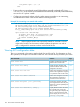
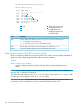
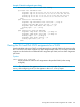
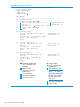

HP Switch(config)# show access-list
Access Control Lists
Type Appl Name
----- ---- ------------------------
ext yes 101
1
std yes 55
2
ext yes Marketing
3
ipv6 no Accounting
4
ipv6 no List-01-Inbound
5
ipv6 yes List-02-Outbound
ipv6 yes Test-1
4
5
1
2
3
These ACLs exist in the
configuration but are
not applied to any
interfaces and thus do
not affect traffic
IPv4
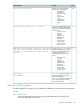
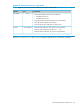
MeaningTerm
Shows whether the listed ACL is an IPv6 (ipv6) ACL or one of two IPv4 ACL types:Type
• std (Standard; source-address only)
• ext (Extended; protocol, source, and destination data)
Shows whether the listed ACL has been applied to an interface (yes/no).Appl
Shows the identifier assigned to each ACL configured in the switch.Name
Viewing the content of all ACLs on the switch
Lists the configuration details for every IPv4 and IPv6 ACL in the running-config file, regardless of
whether any are actually assigned to filter traffic on specific interfaces.
Syntax:
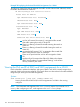
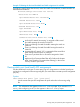
show access-list config
Lists the configured syntax for all IPv4 and IPv6 ACLs currently configured on the
switch.
NOTE: You can use the output from this command for input to an offline text file in which you
can edit, add, or delete ACL commands.
This information also appears in the show running output. If you execute write memory after
configuring an ACL, it appears in the show config output.
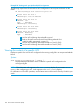
Example 77 (page 135) shows the ACLs on a switch configured with two IPv6 ACLs named
"Accounting" and "List-01-Inbound", and one extended IPv4 ACL named "101":
134 IPv6 Access Control Lists (ACLs)