
IPv6 Configuration Guide K/KA/KB.15.15
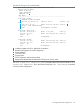
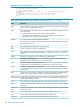
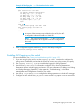
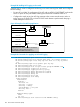

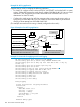

Example 83 Listing an IPv4 extended ACL
HP Switch(config)# show access-list List-120
Access Control Lists
Name: List-120
Type: Extended
Applied: No
1
SEQ Entry
----------------------------------------------------------
10 Action: permit
2
Remark: Telnet Allowed
3
Src IP: 10.30.133.27 Mask: 0.0.0.0 Port(s): eq
23
4
Dst IP: 0.0.0.0 Mask: 255.255.255.255 Port(s):
5
6
Proto : TCP (Established)
7
TOS : - Precedence: routine
20 Action: deny (log)
Src IP: 10.30.133.1 Mask: 0.0.0.255 Port(s):
Dst IP: 0.0.0.0 Mask: 255.255.255.255 Port(s):
Proto : IP
TOS : - Precedence: -
30 Action: permit
Src IP: 0.0.0.0 Mask: 255.255.255.255 Port(s):
Dst IP: 0.0.0.0 Mask: 255.255.255.255 Port(s):
Proto : IP
TOS : - Precedence: -
1
Indicates whether the ACL is applied to an interface
2
Remark Field (Appears if remark configured)
3
Source Address
4
TCP Source Port
6
Protocol Data
7
DSCP Codepoint and Precedence Data
5
Empty field indicates that the destination TCP port can be any value
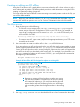
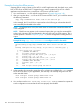
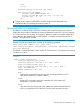
The show access-list identifier config command shows the same ACL data as show
access-list identifier but in the format used by the show [run|config] commands
to list the switch configuration.
Viewing the content of a specific ACL 141