
IPv6 Configuration Guide K/KA/KB.15.15


Creating or editing an ACL offline
Using the CLI to edit an ACL is applicable in most cases where the ACL is short or there is only a
minor editing task to perform. The offline method provides a useful alternative to using the CLI for
creating or extensively editing a large ACL.
For longer ACLs that may be difficult or time-consuming to accurately create or edit in the CLI, you
can use the offline method.
NOTE: Beginning with software release K_12_XX, copy commands that used either tftp or
xmodem also include an option to use usb as a source or destination device for file transfers.
The offline process
1. Begin by doing one of the following:
• To edit one or more existing ACLs, use copy command-output tftp to copy the
current version of the ACL configuration to a file in your TFTP server. For example, to
copy the ACL configuration to a file named acl-001.txt in the TFTP directory on a
server at FE80::2a1:200:
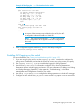
HP Switch# copy command-output 'show access-list config' tftp fe80::2a1:200 acl-001.txt pc
• To create a new ACL, open a text (.txt) file in the appropriate directory on a TFTP server
accessible to the switch.
2. Use a text editor to create or edit the ACLs in the *.txt ASCII file format.
If you are replacing an ACL on the switch with a new ACL that uses the same number or name
syntax, begin the command file with a no ip access-list command to remove the earlier
version of the ACL from the switch's running-config file. Otherwise, the switch will append the
new ACEs in the ACL you download to the existing ACL. For example, if you planned to use
the copy command to replace an ACL named "List-120", you would place this command at
the beginning of the edited file:
no ipv6 access-list List-120
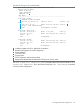
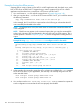
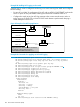
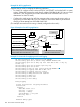
Example 85 An offline ACL file designed to replace an existing ACL
no ipv6 access-list List-120
1
ip access-list "List-120"
2
10 remark "THIS ACE ALLOWS TELNET"
10 permit tcp fe80::17/128 ::/0 eq 23
20 deny ipv6 fe80::123/128 fe80::/125 log
30 deny ipv6 fe80::255/128 fe80::/125 log
40 remark "THIS IS THE FINAL ACE IN THE LIST"
40 permit ipv6 ::/0 ::/0
exit
1
2
Removes an existing ACL and replaces it with a new version
with the same identifier. To append new ACEs to an existing
ACL instead of replacing it, you would omit the first line and
ensure that the sequence numbering for the new ACEs begin
with a number greater than the highest number in the existing
list.
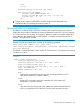
3. Use copy tftp command-file to download the file as a list of commands to the switch.
Creating or editing an ACL offline 143