
IPv6 Configuration Guide K/KA/KB.15.15
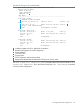
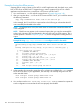
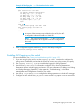
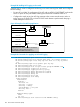
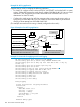
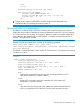

Example 87 Verifying the .txt file download to the switch
HP Switch(config)# show run
. . .
ipv6 access-list "acl-001"
10 remark "Telnet Denied Here"
10 deny tcp ::/0 ::/0 eq 23
30 deny tcp ::/0 ::/0 log
40 deny icmp ::/0 ::/0 134
50 deny icmp ::/0 ::/0 133
60 permit ipv6 ::/0 ::/0
exit
. . .
vlan 20
1
ipv6 access-group "acl-001" vlan
ipv6 access-group "acl-001" in
exit
. . .
1
As a part of the instruction set included in the .txt file, the ACL
is assigned to inbound IP traffic on VLAN 20
NOTE: The comment preceded by " ; " in the .txt source file
for this configuration do not appear in the ACL configured in
the switch
5. If the configuration appears satisfactory, save it to the startup-config file:
HP Switch(config)# write memory
Enabling ACL logging on the switch
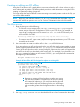
For more information, see “Testing and troubleshooting ACLs” (page 157).
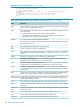
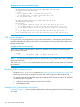
1. If you are using a syslog server, use the logging ip-addr command to configure the
syslog server IP addresses; ensure that the switch can access any syslog servers you specify.
2. Use logging facility syslog to enable the logging for syslog operation.
3. Use the debug destination command to configure one or more log destinations.
Destination options include logging and session. For more information on debug, see "Debug
and Syslog Messaging Operation" in the appendix, "Troubleshooting", in the latest
Management and Configuration Guide for your switch.
4. Use debug acl or debug all to configure the debug operation to include ACL messages.
5. Configure an ACL with the deny or permit action and the log option in one or more ACEs.
Enabling ACL logging on the switch 145