
IPv6 Configuration Guide K/KA/KB.15.15
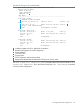
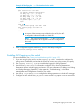
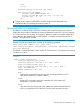

Example 90 ACL log application
Suppose that you want to configure the following operation:
• For VLAN 10, configure an ACL with an ACL-ID of "NO-TELNET" and use the RACL in option
to deny Telnet traffic entering the switch from IP address 2001:db8:0:4b1::10:3 to any routed
destination. (This assignment will not filter Telnet traffic from 2001:db8:0:4b1::10:3 to
destinations on VLAN 10 itself.)
• Configure the switch to send an ACL log message to the current console session and to a
syslog server at 2001:db8:0:4b1::20:3 on VLAN 20 if the switch detects a packet match
denying a Telnet attempt from 2001:db8:0:4b1::10:3.
(This example assumes that IPv6 routing is already configured on the switch.)
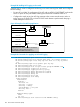
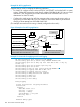
Figure 9 Example of an ACL log application
VLAN 20
2002:db8:0:4b1::20:1
Subnet
VLAN 10
2002:db8:0:4b1::10:1
Subnet
Syslog
Apply the ACL "NO TELNET" as a RACL
here to deny Telnet access to inbound, routed
Telnet traffic from 2002:db8:0:4b1::10:3.
Block Telnet access to routed
destinations from this host.
Switch
Consol
Console RS-232
2002:db8:0:4b1::
2002:db8:0:4b1::
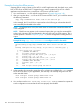
Example 91 Commands for applying an ACL with logging
HP Switch(config)# ipv6 access-list NO-TELNET
Switch(config-ipv6-acl)# remark "deny TELNET TRAFFIC IN"
Switch(config-ipv6-acl)# deny tcp host 2001:db8:0:4b1::1 any eq
telnet log
Switch(config-ipv6-acl)# permit ipv6 any any
Switch(config-ipv6-acl)# exit
Switch(config)# vlan 22 ipv6 access-group NO-TELNET in
1
Switch(config)# logging 2001:db8:0:4b1::20:3
Switch(config)# logging facility syslog
Switch(config)# debug destination logging
Switch(config)# debug destination session
Switch(config)# debug acl
Switch(config)# write mem
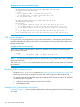
Switch(config)# show debug
Debug Logging
Source IP Selection: Outgoing Interface
Destination:
Logging --
2001:db8:0:4b1::20:3
Facility = syslog
Severity = debug
System Module = all-pass
Priority Desc =
Session
Enabled debug types:
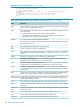
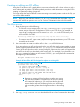
148 IPv6 Access Control Lists (ACLs)