
IPv6 Configuration Guide K/KA/KB.15.15


event
acl log
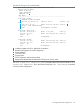
HP Switch(config)# show access-list config
ipv6 access-list "NO-TELNET"
10 remark "deny TELNET TRAFFIC IN"
10 deny tcp 2001:db8:0:4b1::10:3/128 ::/0 eq 23 log
20 permit ipv6 ::/0 ::/0
exit
1
Assigns the ACL named “NOTELNET”as an RACL to filter routed Telnet traffic from
2001:db8:0:4b1::10:3 entering the switch on VLAN 10
Monitoring static ACL performance
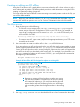
ACL statistics counters provide a means for monitoring ACL performance by using counters to
display the current number of matches the switch has detected for each ACE in an ACL assigned
to a switch interface. This can help, for example, to determine whether a particular traffic type is
being filtered by the intended ACE in an assigned list, or if traffic from a particular device or
network is being filtered as intended.
NOTE: This section describes the command for monitoring static ACL performance. To monitor
RADIUS-assigned ACL performance, use either of the following commands:
show access-list radius [ all | port-list ]
show access-list radius [ authenticator | mac-based | web-based ] clients
port-list detailed
See chapter "Configuring RADIUS Server Support for Switch Services" in the latest Access Security
Guide for your switch.
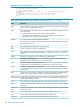
Syntax:
[ show | clear ] statistics
aclv4 acl-name-str port port-#
aclv4 acl-name-str vlan vid [ in | out | vlan ]
aclv6 acl-name-str port port-#
aclv6 acl-name-str vlan vid vlan [ in | out | vlan ]
aclv6 acl-name-str
tunnel tunnel-id [ in | out ]
show
Displays the current match (hit) count per ACE for the specified IPv6 or IPv4
static ACL assignment on a specific interface.
clear
Resets ACE hit counters to zero for the specified IPv6 or IPv4 static ACL
assignment on a specific interface.
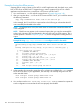
Total
This column lists the running total of the matches the switch has detected for the
ACEs in an applied ACL since the ACL's counters were last reset to 0 (zero).
Monitoring static ACL performance 149