
IPv6 Configuration Guide K/KA/KB.15.15
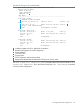
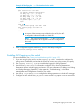
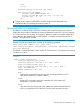

Example 92 Both IPv6 and IPv4 ACL activity
HP Switch# show statistics aclv6 IPV6-ACL vlan 20 vlan
HitCounts for ACL IPV6-ACL
Total
( 12) 10 permit icmp ::/0 fe80::20:2/128 128
( 6) 20 deny tcp ::/0 fe80::20:2/128 eq 23 log
( 41) 30 permit ipv6 ::/0 ::/0
HP Switch# show statistics aclv4 102 vlan 20 vlan
HitCounts for ACL 102
Total Delta
( 4) 10 permit icmp 10.10.20.3 0.0.0.0 10.10.20.2 0.0.0.0 8
( 8) 20 deny icmp 0.0.0.0 255.255.255.255 10.10.20.2 0.0.0.0 8
( 2) 30 permit tcp 10.10.20.3 0.0.0.255 10.10.20.2 0.0.0.255 eq
23
( 2) 55 deny tcp 0.0.0.0 255.255.255.255 10.10.20.2 0.0.0.0 8
(125) 60 permit ip 0.0.0.0 255.255.255.255 0.0.0.0 255.255.255.255
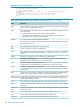
ACE counter operation
For a given ACE in an assigned ACL, the counter increments by 1 each time the switch detects a
packet that matches the criteria in that ACE, and it maintains a running total of the matches since
the last counter reset.
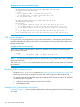
Example 93 ACE counter operation
In ACL line 10 below, there has been a total of 37 matches on the ACE since the last time the
ACL's counters were reset.
Total
( 37) 10 permit icmp ::/0 fe80::20:2/128 128
NOTE: This ACL monitoring feature does not include hits on the "implicit deny" that is included
at the end of all ACLs.
Also, if the show statistics command does not show any ACE hit activity at first use, re-execute
the command.
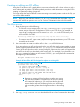
Resetting ACE hit counters to zero
• Using the clear statistics command, see “Monitoring static ACL performance” (page 149)
• Removing an ACL from an interface zeros the ACL's ACE counters for that interface only.
• For a given ACL, either of the following actions clear the ACE counters to zero for all interfaces
to which the ACL is assigned:
• Adding or removing a permit or deny ACE in the ACL.
• Rebooting the switch.
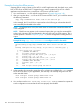
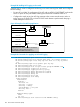
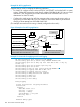
Example of ACL performance monitoring
Example 94 (page 151) shows a sample of performance monitoring output for an IPv6 ACL assigned
as a VACL.
150 IPv6 Access Control Lists (ACLs)