
IPv6 Configuration Guide K/KA/KB.15.15
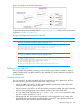
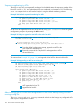
Remember that show config lists the startup-config file and show running lists the running-config
file.
Testing and troubleshooting ACLs
You can monitor ACL performance by using the logging option (which generates log messages
when there is a "deny" or “permit” ACE match) and the ACE statistics counters (which maintain
running totals of the packet matches on each ACE in an ACL).
Enable IPv6 ACL "Deny" or “Permit” logging
ACL logging enables the switch to generate a message when IP traffic meets the criteria for a match
with an ACE that results in an explicit "deny" or “permit” action. You can use ACL logging to help:
• Test your network to help ensure that your ACL configuration is detecting and denying the
incoming IPv6 traffic you do not want to enter the switch, or permitting the traffic.
• Receive notification when the switch denies inbound IPv6 traffic you have designed your ACLs
to reject (deny), or permits traffic you have designed your ACLs to allow (permit).
The switch sends ACL messages to syslog and optionally to the current console, Telnet, or SSH
session. You can use logging to configure up to six syslog server destinations.
Requirements for using IPv6 ACL logging
• The switch configuration must include an ACL:
Assigned to a port, trunk, or static VLAN interface1.
2. Containing an ACE configured with the deny or permit action and the log option.
• If the RACL application is used, IPv6 routing must be enabled on the switch.
• For IPv6 ACL logging to a syslog server:
The server must be accessible to the switch and identified in the running configuration.•
• The logging facility must be enabled for syslog.
• Debug must be configured to:
• Support ACL messages
• Send debug messages to the desired debug destination
These requirements are described in more detail under “Enabling ACL logging on the switch”
(page 145).
ACL logging operation
When the switch detects a packet match with an ACE and the ACE includes the deny or permit
action and the optional log parameter, an ACL log message is sent to the designated debug
destination. The first time a packet matches an ACE with deny or permit and log configured,
the message is sent immediately to the destination and the switch starts a wait-period of
approximately five minutes. (The exact duration of the period depends on how the packets are
internally routed.) At the end of the collection period, the switch sends a single-line summary of
any additional "deny" matches for that ACE (and any other "deny" ACEs for which the switch
detected a match). If no further log messages are generated in the wait-period, the switch suspends
the timer and resets itself to send a message as soon as a new "deny" match occurs. The data in
the message includes the information illustrated in Example 103 (page 158).
Testing and troubleshooting ACLs 157