
IPv6 Configuration Guide K/KA/KB.15.15

Configuring global IPv6 routing parameters
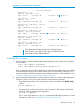
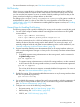
PageDefault and rangeFeature
169255 (1 - 255)IPv6 hop-limit
169None configuredDefault network route
176Lowest-numbered address on the
lowest-numbered routing interface
Router ID
The following sections describe how to configure the above global IPv6 routing parameters.
NOTE: This section describes how to configure IPv6 parameters for routing switches. For host-based
IPv6 configuration information (Ipv6 routing not enabled), see “IPv6 Addressing Configuration”
(page 11).
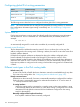
System router ID
Each routing switch uses a unique router ID to identify itself when exchanging route information
with other devices. This ID is formatted as a 32-bit dotted-decimal (IPv4 format) number. For
example:
10.100.215.1
An automatically assigned ID is used unless overridden by a manually configured ID.
Automatic router ID selection
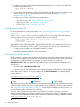
The first detected IPv4 address becomes the router ID. Prior to a reboot, this can be any IPv4
address configured on the routing switch. Following a reboot, the router ID is set to the lowest IPv4
loopback address detected.
If multiple IPv4 loopback addresses are detected at reboot, the address configured on the
lowest-numbered IPv4 loopback interface (lo0 through lo7) becomes the router ID. If the
lowest-numbered loopback interface has multiple IPv4 addresses, the lowest of these addresses is
selected as the router ID. Once a router ID is selected, it does not automatically change unless a
higher-priority address is configured on the routing switch and the routing protocol is restarted with
a reboot.
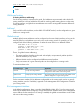
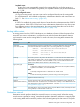
Different route types in the IPv6 routing table
Default route (::/0)
A static route used by all traffic that has a destination network not reachable through any other
IPv6 route in the routing table. See “Configuring the IPv6 default route” (page 169).
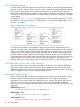
Directly-connected routes
Destinations on the router itself. One route is automatically entered per configured IPv6 interface.
Each such route is automatically assigned an administrative distance of "0" and a metric of
"1". Directly-connected routes include:
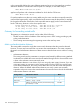
IP routing interface
Where the routing switch is connected to a next-hop router on the same interface, a route
is automatically entered for the network on which the IP routing is configured. This includes
destinations for both global unicast and link-local addresses configured on the routing
switch for that interface.
Manually configured IPv6 loopback interfaces
IPv6 loopback interfaces that are manually configured.
176 IPv6 Routing Basics