
IPv6 Configuration Guide K/KA/KB.15.15
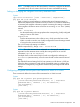
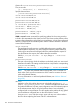

Example 118 Configuring static routes
HP Switch(config)# ipv6 route 2001:db8:0:1::/64 fe80::10.1
Configures static route to a specific destination network . Notice that the next-hop
gateway can be either a link-local or a global unicast address.
HP Switch(config)# ipv6 route 2001:db8:0:2::/64 reject
Configures a null route to drop traffic for the 2001:db8:0:2::/64 network and
return an ICMP notice to the sender.
HP Switch(config)# ipv6 route 2001:db8:0:5::/64 blackhole
Configures a null route to drop traffic for the 2001:db8:0:2::/64 network without
ICMP notice to the sender.
HP Switch(config)# ipv6 route 2001:db8::/48 vlan 66 distance 120
Configures a static route for traffic to destinations in the 2001:db8:0::/48 network.
Sets the administrative distance higher than the default distance for any dynamic
routes discovered for the same destination, which gives precedence in the routing
table to dynamic routes.
Switch(config)# ipv6 route 2001:db8:0:3::/64 tunnel 3 distance 130
Configures a static route for traffic to destinations in the 2001:db8:0:3::/64 network.
Viewing static route information
Syntax:
show ipv6 route [ ipv6-addr | connected | static | ospf3 ]
Lists all entries in the IPv6 routing table.
ipv6-addr
Lists entries for a specific IPv6 address. Can be followed by any of the other
options for this command.
connected
Lists entries for connected routes. Can be followed by the ipv6-addr option
to list only the connected routes having a specific link-local or global IPv6
address.
static
Lists entries for static routes in the routing table. Can be followed by the
ipv6-addroption to list only the static routes matching a specific destination.
ospf3
Lists the entries for OSPFv3 routes in the routing table. Can be followed by the
ipv6-addroption to list only the OSPFv3 routes matching a specific destination.
Example 119 (page 182) shows the static routes in the routing table for Router "B" in Figure 14
(page 183).
Viewing static route information 181