
IPv6 Configuration Guide K/KA/KB.15.15
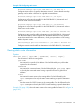
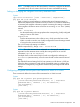
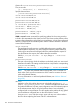

Example 119 Displaying static routes in the IPv6 routing table
HP Switch(config)# show ipv6 route static
IPv6 Route Entries
Destination : 2620:a::/64
Gateway : 2620:b::22:1
Type : static Sub-Type : NA Distance : 1 Metric : 1
Destination : 2620:c::/64
Gateway : 2620:e::55:2
Type : static Sub-Type : NA Distance : 1 Metric : 1
About static routing
Static routes provide tools for restricting and troubleshooting routed traffic flows and in small
networks can provide the simplest and most reliable configuration for IPv6 routing.
Static routes are manually configured in the routing table. A static route entry comprises the
following:
• IPv6 network prefix for the route's destination network
• Next-hop gateway, which can be one of the following:
Either the link-local address and VLAN ID or the VLAN link to the next-hop router•
• Global unicast address on the next-hop router
• A "null" interface (the routing switch drops traffic forwarded to the null interface)
• Optionally, a nondefault administrative distance
NOTE: To enable routing in both directions on a static route, you must configure reciprocal static
routes on the routers at both ends of the route.
On a given routing switch you can create one static route or null route to a given destination.
Multiple static or null routes to the same destination are not supported.
The routing switches can concurrently support a maximum of 256 IPv6 static routes and 256 IPv4
static routes.
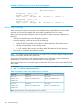
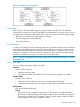
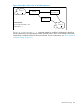
For example, in Figure 14 (page 183), static routes enabling routed traffic between routers "A,"
"B," and "C" could be configured as follows:
Table 15 Example of static route configuration in a network
Router "C"Router "B"Router "A"
ipv6 routeipv6 routeipv6 route
2620:c::/64 2620:b::22:22620:a::/64 2620:b::22:12620:a::/64
2620:e::55:1
ipv6 routeipv6 routeipv6 route
2620:e::/64 2620:b::22:22620:c::/64 2620:e::55:22620:b::/64
2620:e::55:1
Note: Next-hop addresses can be either global unicast or link-local.
182 IPv6 Static Routing